Tampilkan postingan dengan label android. Tampilkan semua postingan

Selasa, 29 November 2016

Android key mobile competition Security


Google has dismissed the European commission’s charges that it abuses the market dominance of its Android operating system to prevent rivals from competing with alternative software and services.


The EC filed charges in April that could carry a fine for Google of up to $7.4bn (£5.9bn), or 10% of its global revenue, and centre on what the commission saw as “unjustified restrictions and conditions” placed on smartphone and tablet makers, preventing them from choosing other, non-Google default search engines and browsers.

Kent Walker, senior vice president and general counsel for Google, said: “Android hasn’t hurt competition, it’s expanded it. Android is the most flexible mobile platform out there, balancing the needs of thousands of manufacturers and operators, millions of app developers and more than a billion consumers. Upsetting this balance would raise prices, hamper innovation, reduce choice and limit competition.”

In its response to the EC today, Google objects to several of the commission’s premises, including the view that Google’s Android does not compete with Apple’s iOS operating system that runs iPhones and iPads.

Walker said: “The commission’s case is based on the idea that Android doesn’t compete with Apple’s iOS. We don’t see it that way. We don’t think Apple does either. Or phone makers. Or developers. Or users.

“To ignore competition with Apple is to miss the defining feature of today’s competitive smartphone landscape.”

The company claims that its agreements with smartphone makers, which insist that a suite of Google apps be pre-installed on devices with some positioned on the homescreen when a device is first started, allow Google to distribute Android for free and continue investing in the development of the platform.

Industry watchers said Google’s prospects of making money from advertising could diminish if its apps were not pre-loaded on devices, despite users being free to delete many of them and replace all of them apps of their choosing.

It also insists that its agreements are crucial to allow anyone to take Android and modify it to suit their requirements, but maintain a level of control on compatibility to help prevent so-called fragmentation, where one version is incompatible with another.

Walker said: “Our voluntary compatibility agreements enable variety while giving developers confidence to create apps that run seamlessly across thousands of different phones and tablets. This balance stimulates competition between Android devices as well as between Android and Apple’s iPhone.”

Google’s Play Store has more than 2.2m third-party apps available for download across 1,000s of devices, including apps from the search company’s chief rivals, Apple, Microsoft and Facebook, of which Facebook, Facebook Messenger, Instagram and WhatsApp have been downloaded more than 1bn times.

Commenting on the EC’s case, Daniel Castro, vice president of tech policy think tank ITIF said: “If Google instead only sold Google-made devices, it would … control all aspects of the operating system plus the apps it includes on Android devices.

“This is exactly what companies like Apple and Blackberry have long done with their respective mobile operating systems, yet the practice is not considered anti-competitive for them.”

The case against Android comes at a time when Google is also embroiled in a battle with the EC over its Shopping search engine feature and its AdSense text advertising service. Last week, Google dismissed the commission’s Shopping case with similar rhetoric, saying that its competition with Amazon should be taken into account.

Senin, 21 November 2016

The Moto Z gets a Nougat update and Daydream certification


The last time we checked in on Nougat market share numbers (a little over a week ago), the latest version of Google’s operating system was ranked below Gingerbread in terms of adoption. Slowly but surely the needle is starting to move. A handful of manufacturers have announced updates for their devices in the lead up to the holiday, including both variants of the OnePlus 3.

This week, Motorola’s modular Moto Z handsets will be getting Android 7.0 (not 7.1, mind) this week – or at least the Moto Z and Z Force – no word yet on the Play, but it’ll likely follow fairly shortly after, as that’s how these things tend to go.

Along with the software upgrade comes Daydream compatibility, meaning you’ll be able to plug the phone into Google’s new VR headset without any hassle, marking the first non-Google-branded handset to be certified with that official distinction. Perhaps Google is throwing a little love toward its former sub-brand.

At the very least, the Pixel is about to get a little less lonely on the Daydream page, and Motorola’s bringing some more key functionality to its most compelling handset.

ZTE announces Force Touch-equipped version of its Axon 7


A few days after OnePlus announced a souped-up verson its flagship smartphone, the OnePlus 3T, ZTE is following suit with the Axon 7.

The limited edition phone is available starting today for $499.98 direct from ZTE's website.

The upgraded Axon 7 is the first ZTE device available in the US with a pressure sensitive display, ZTE calls Force Touch. If that name sounds familiar, that's because it's the same name Apple uses for similar technology on the Apple Watch and its Mac trackpads. The same tech is used in the iPhone with the name 3D Touch.

Through Force Touch users gain the ability to press on the screen to trigger various actions. If you press on an app icon it will bring up a shortcut to launch to a specific task within the app. For example, you could Force Touch on the messaging app to display a shortcut to create a new conversation or select an existing conversation.

Also included for the $100 premium over the standard Axon 7 is 6 gigabytes of memory, and 128 gigabytes of storage.

The new Axon 7 model will use the same Qualcomm Snapdragon 820 processor, microSD card support, 20-megapixel rear camera, 8-megapixel front camera, 3,250 milliamp-hour battery, and 5.5-inch display.

Minggu, 20 November 2016

Huawei Mate 9 really want a 5.9in phablet


Huawei’s new smartphone has a massive 5.9in screen. But just how big do you really want your smartphone to be?


Phablets – smartphones with screen sizes over 5.5in – have become more and more popular, showing a trend migration from their Asian origins to the US and Europe. Even Apple, famous for smaller smartphones, launched a phablet in 2014 with the iPhone 6 Plus. But few phablets have stretched their screens beyond 5.7in.

The new €699 (£621) Huawei Mate 9 has a 5.9in full HD display, dual cameras on the back, is 7.9mm thick and runs the company’s latest version of its customised Android 7.0 Nougat called Emotion UI 5. It also has Huawei’s latest processor, which the company claims is 20% more powerful than its previous generation and more powerful in multi-core operations than Apple, Samsung or Qualcomm’s latest processors.

But the question remains whether buyers in the US and Europe want such a large screen. Previous iterations of the Mate line have not been sold en masse in stores, meaning the Mate 9 is the first of Huawei’s super-sized phablets to officially roll out in the UK.


With the failure of Samsung’s Note 7, which was expected to be the big seller in the phablet category, Huawei and others have an opportunity to fill the gap. While others have concentrated on the smaller end of the phablet scale, with Google’s Pixel XL having a 5.5in screen, Huawei has attempted to address poor battery life and the slowing down of phones over time.

To do that, the Mate 9 has a large 4,000mAh battery that’s about 500mAh larger than most mainstream phablets, including the Pixel XL, along with a learning-based system, which runs locally on the phone and detects usage patterns, preparing apps that are normally used at certain times of the day to launch faster without impacting battery life or performance.

Huawei claims the system will also be able to run maintenance routines overnight, clear out the cruft and keep the phone running like new two years down the line. Compared with previous versions of the company’s software, it is expected to run 80% faster after a year.

The Mate 9’s large battery also has Huawei’s new fast-charging system, which like OnePlus’s Dash Charge, moves some of the electronics required to safely charge a battery at high voltage into the charger. The company claims that the new charge system will be able to reach 58% battery capacity in 30 minutes, with a full charge in 90 minutes.


“Battery management research and development is performed in house, and given recent developments we’ve upped research and development spend to make sure nothing similar can happen. We spend a year qualifying and testing components such as batteries both internally and externally before going on sale,” said Ed Gemmell, Huawei’s consumer business group director of communications.

Tablet sales, along with PC sales, are shrinking, as more people use their smartphone as their primary computing device. But whether European and US consumers will take to such a large smartphone remains to be seen.

A limited edition Mate 9 Porsche Design variant, with a smaller 5.5in quad HD curved screen and similar specifications will also be available in the UK and EU costing €1,395 (£1,238), but not in the US.

Rabu, 16 November 2016

Google's request for map of Korea denied


Google's request for a detailed map of South Korea for Google Maps has been denied by the government.

The decision was made by a joint-committee led by the country's transport ministry and IT, foreign affairs, unification, defense, administration, and trade ministries. The committee cited "security concerns" as the reason behind the decision.

The final call comes after a delay from the initial August deadline for the US search giant's request in June. The postponement is speculated to have been caused by the US election, so as to wait for the election results and see the stance of President-elect Donald Trump before making a decision.

This is not the first time Google has requested access to more detailed maps from South Korea. The company has been requesting access to Korean maps that include navigation details and driving directions since 2010, which have been repeatedly refused.

South Korea, which is technically at war with North Korea since the armistice in 1953, has strict regulations over revealing map information.

Current law doesn't allow detailed maps to be housed in servers outside of the country. Google has created a server in South Korea to service the map of the country in a limited capacity.

Sabtu, 05 November 2016

Samsung Launch the Galaxy Blue Coral S7 Edge


Samsung Corp. on Thursday announced it will launch the Galaxy S7 Edge in Blue Coral colors on Friday in its home country of South Korea.

The widely-praised color variation was first applied to the Galaxy Note 7, which the company ended for good on October due to battery explosions.

The Galaxy S7 Edge Blue Coral version has blue shades in the front and back glasses, a blue back cover, and rose gold rims. It will come in both 32GB and 64GB models.

The new phone will be available from all three local telcos, SK Telecom, KT, and LG Uplus. It is expected to be available in the US on November 18.

Samsung has been promoting the S7 and S7 Edge to offset as much as possible the huge loss from ending the Note 7. The company’s mobile division’s fortune will depend on the upcoming Galaxy S8 that is expected early next year, which will have Samsung’s own AI assistant on it.

The South Korean tech giant last month acquired Viv, which was founded by members who made Apple’s voice assistant Siri.

Samsung also confirmed that it intends to launch a Galaxy Note 8, and continue that line of phablets despite the recent fiasco.

In the local market, rivals Apple and LG saw some sales bump immediately after the end of the Note 7, but sales have not stabilized, an official from local telcos said.

Kamis, 20 Oktober 2016

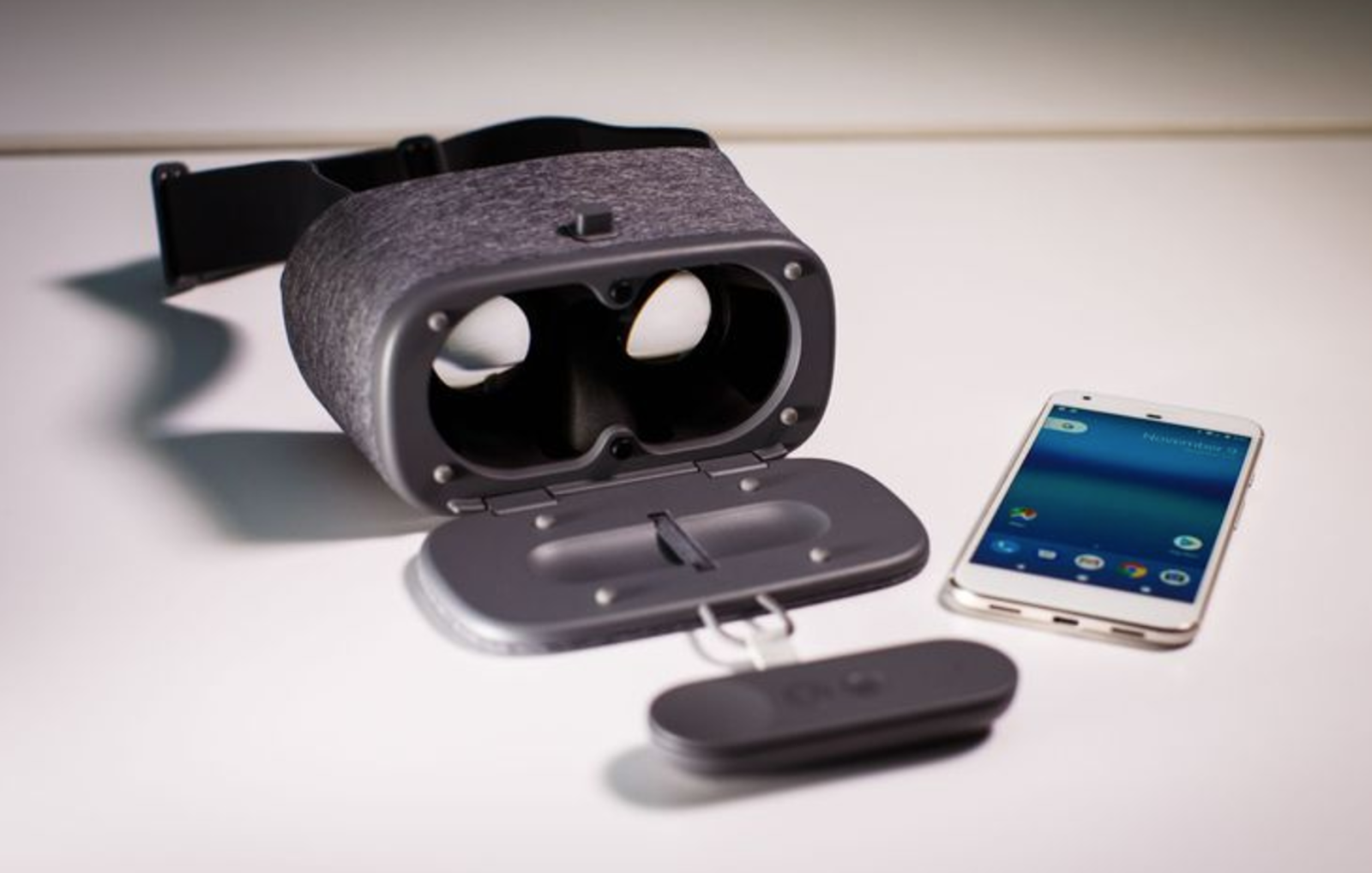
Review : Google Daydream View


Cardboard is cheap. Gear VR only works with Samsung phones. The pricy Oculus Rift and HTC Vive require an expensive gaming PC and loads of setup, and the PlayStation VR needs a PS4.

Virtual reality is hard.
But for $79, £69 or AU$119, Google's new Daydream View could be the break we've been waiting for.

It's a soft cloth eyebox that turns any compatible phone into a VR headset, and it comes complete with its own Wii-like motion controller for manipulating objects and menus in VR.

It's the easiest VR to use by far, But does that mean you should run out and buy one? Not necessarily. Not yet, anyhow.

Magical but murky
One of the pitfalls of most VR is the number of cords, ports and things you have to adjust. The Daydream View puts them all to shame. Here are the steps to set it up:

Open the headset's front door and remove the included controller
Turn on your phone (if it's off) and place it on the door
Close the door, place the headset on your head and adjust until the image looks clear
Adjust the straps
Hold down a button on the controller to calibrate, and start playing.
That's it. No adjusting the lenses, no fiddling with pairing procedures, no ports or cables to plug in. The phone automatically pairs with the headset and adjusts the screen to the correct position, like magic.

Once you're inside, the included motion controller makes navigating menus a breeze. Just point where you want to go, and a little mouse cursor follows your motion quickly and accurately.

Just know that "easy" doesn't mean "perfect."

When I handed the Daydream View to my colleagues, many of them instinctively put it on the wrong way. The curved straps are supposed to rest on top of your head (like a crown) but it's tempting to cinch them down like a pair of ski goggles -- which isn't terribly comfortable.

And though the Daydream View is almost entirely made of soft, cushiony fabric instead of hard plastics, that didn't stop my wife and colleagues from complaining how front-heavy it was with a large Pixel XL phone inside. Even if it weighs less than a pound (roughly 0.85 lbs with the phone) there's still potential for neck strain over time.

The image quality is good -- I definitely felt like I was somewhere else! -- but it's not going to fool anyone who doesn't want to be fooled. And I often found I had to recalibrate the headset and controller in the middle of a session (it's easy -- just hold down the home button).

I even found a bug that makes VR totally unusable until I reboot the phone -- though I understands a software fix for that is coming soon.

Here's the rub: unless you have a Google Pixel or other Daydream-certified phone, the Daydream View won't work at all. That's by design: Google's pitch is that Daydream can keep you from getting sick in VR by ensuring both phones and apps meet a certain quality standard.

But that means a murky future for Daydream, because we honestly don't know how many phone manufacturers and app developers will wholeheartedly support Google's new platform -- or if the results will be as good as these preliminary ones. Even the 5-inch Pixel offers a lesser experience than the 5.5-inch Pixel XL, because its screen is lower-resolution.

Kamis, 15 September 2016

Review : Xiaomi Mi 5

When the Xiaomi Mi3 launched in Malaysia a couple of years ago, it had been, for lack of a better word, a veritable phenomenon; a Full HD smartphone with the blistering, at the time, Qualcomm Snapdragon 800 for under RM1,000 is truly unheard of. As expected, demand became so great that the first flagship smartphone for Xiaomi routinely sold out.

It seemed like everyone and his uncle either had one or is clamouring for one. Xiaomi had seemingly crashed the proverbial party, sending their rivals into a rethink. In the intervening couple of years between then and the launch of their new flagship, the Xiaomi Mi 5, the landscape has changed quite a bit: ‘Flagship killers’ abound, all of which boast high-end specs for a fraction of what they used to cost.


Can the this new entrant maintain Xiaomi’s momentum as it transitions from upstart into a mainstay?

Design: Metallic Compromise

Wrapped in an aluminium shell, the Xiaomi Mi 5 ticks most boxes when it comes to high-end smartphone design. Its curved edges break the monotomy of most boxy designs and makes it looks very similar to Samsung’s Galaxy S7. Where they differ though, is Xiaomi’s decision to make it more of a slant rather than a simple curve, resulting in a chassis that can be rather difficult to hold with confidence.


As I was usually only holding a small surface area of the phone, it always felt like it was going to slip out of my hands. Still, usability aside, it’s certainly a beautiful phone to behold and will attract its fair share of attention.

The volume rocker and power button are easy to depress and provide good tactile feedback. Nested within the physical home button is also a finger print reader like one found on the Apple iPhone. However, Xiaomi’s application leaves a little to be desired; not only does the narrow button consistently fail to identify my fingerprint, it also hangs for some time before it recognises a second input, leading me to simply key in the PIN most of the time.


It also requires the button to be depressed for the fingerprint reader to be activated, a move that is far less efficient than the round back-facing fingerprint reader found on other smartphones like the Google Nexus 6P or ASUS ZenFone 3.

At the very least, it rocks a USB Type-C port. That is a must for flagships now.


Performance: Red Hot Literally

Like most flagships, the Xiaomi Mi 5 packs the latest Qualcomm Snapdragon 820, promising lightning fast speeds and smoothness. Unfortunately, unlike other markets, we’ll only be getting the lower spec variant, clocking in at 1.8GHz compared to the full bore processor at 2.15GHz. Predictably, benchmarks do take a sizable hit, with Geekbench 3 only delivering 1904 for the single core score and 4664 for the multi-core.

This compares poorly against the international benchmarks of around 2300 for the Single-Core and 5300 for the Multi-Core. Thankfully though, general performance of the Xiaomi Mi 5 remains snappy; applications open swiftly, multitasking was a breeze and the Adreno 530 made short work of even the latest games.

Strangely, though, despite the lower clock speed of the Qualcomm Snapdragon 820 processor, the Xiaomi Mi 5 became really hot even doing minor things such as web browsing. Occasionally, the phone would start burning up as it simply sits in my pocket. While the heat didn’t affect the performance of the device much, it is disappointing that the temperature management is a real issue here. Unlike previously, I'd expect most users will now be forced to get a case to deal with it.

Display: Vibrant Enough

Despite only packing a Full HD display compared with the 1440p resolution of something like a LG G5, the 5.15in IPS panel here is absolutely gorgeous, with great brightness, detail and contrast being punched out. At this screen size, pixelation is more or less non-existent and most people will be very happy with it. In terms of colours, it errs towards a more vivid template like a Samsung panel as opposed to more muted, realistic colours you get on the Apple iPhone.

Additionally, while the top and lip of the phone still sport sizable bezels, the sides of the display are almost edge-to-edge, leading to a truly immersive viewing experience when watching videos or playing games.


Audio: Falls Short

Unfortunately, the user immersion is broken down by the sub-par speakers found on the Xiaomi Mi 5. Bad enough that it is down-firing, the single speaker, which is barred up with a single grill piece, barely passes the mustard when it comes to audio fidelity, with overly sharp highs and muddy mids.

The bass is pretty much absent as well, leading to a hollow sounding experience. Thankfully, the Xiaomi Mi 5 still packs a 3.5mm audio jack, so you can quickly plug in a good pair of cans. Unlike an upcoming flagship from Cupertino.


Camera: Commendably Usable

With a 16MP, f /2.0 rear facing camera, the Xiaomi Mi 5 comes loaded with a shooter that is more or less par for the course specs wise. However, when compared to the kings of the hill, it can’t match-up just yet. Make no mistake; this new Xiaomi flagship is definitely a decent shooter.

Most at ease in a brightly lit environment, the Xiaomi Mi 5 main camera is perfectly capable of producing images with decent colours and details. HDR also worked pretty well, though you’ll need some very stable hands to get clear shots.

Where it tends to suffer a little is when the ambient lighting starts getting dark. The software tends to aggressively bump the ISO up, resulting in some pretty grainy images that hurt the overall clarity. While not truly perfect, it’ll definitely do in a pinch.


On the flip side, its front camera will certainly satisfy the selfie taker in most of users as it comes with a wide enough angle lens to get most of subjects in the picture. It also helps that the shots produced are clear and full of detail.

Conclusion: It Delivers as Promised

Xiaomi may still be a juggernaut in the sub-RM1,000 (~US$250) smartphone segment, but as a flagship model approaching the psychological RM2,000 mark, the Xiaomi Mi 5 isn’t such an easy choice.

With competitors like OPPO and OnePlus, the Xiaomu Mi 5 needs to distinguish itself a bit more. It’s certainly a capable smartphone, but there are other options out there that might tempt even the most hardcore of Xiaomi fans around the block.

Kamis, 08 September 2016

Hands On With the Google Nexus Player


Google's Nexus Player is the company's best stab at the TV so far. I got a demo of it today at a Google event, and I'm hopeful. Hopefully, we'll see Android TV introduced into sets at CES.

The Nexus Player is a little disc, made by Asus and running an Intel Silvermont processor, which plugs into your TV. It comes with a small black remote (simple, not complex like some of the silly Google TV remotes were), and it has an optional gamepad. Its only ports are an HDMI-out, a power port, and a USB jack; I didn't see Ethernet, for instance.

Plug it into your TV, and you see a "smart TV" interface centered on content from Google Play, which takes top billing. What's really interesting is what's going on down below, though. According to Google, the Nexus Player is "just an Android device" and will run "any app downloaded from Google Play."

I can't wait to see how that plays out. Games, for instance, are restricted by their interfaces. If you want to play games, you'll probably want a Bluetooth gamepad like Asus's $39 unit, and you'll want to play gamepad-compatible games. Fortunately, there are a lot of those nowadays. You can also use a paired Android phone as an input device.


View all Photos in Gallery
The hotter question is whether all the Google Play entertainment apps will let themselves be run on the Nexus Player. Our demo sample showed Netflix, Pandora, Hulu and, of course, YouTube. So far, so good. But what about HBO GO? And Amazon, which has structured its Prime streaming app so it plays on Android phones but not tablets? Whether you'll really be able to play any content that Android suppors, or whether content owners will block this device, is a critically unanswered question.

The Nexus Player also does everything a Chromecast does, showing content from other Android devices in the home.

Like with Amazon's Fire TV , Google has also invested in voice search being a major way to search the company's content library. A search for "Halloween movies," spoken into the remote, turned up the whole horror movie series on Google Play and a lot of more family-friendly content on YouTube.

The Nexus Player costs $99 and enters a crowded field full of Amazon Fire TVs, Chromecasts, Rokus and such. They all suffer from the "Input 1 problem," which is that most ordinary consumers don't want to have to switch inputs away from their cable box or console gaming system for their content.

But the Nexus Player's real value is as a harbinger of Android TV. Sony, Sharp, and Philips have all said they'll bring Android TVs to market soon, probably at CES. The smart TV market is still a mess of competing, complex, proprietary interfaces, which has slowed the development of TV-compatible apps in general. Google's going to make a bid here, once again, to standardize and simplify.

For more, see PCMag's hands on with the Nexus 6 smartphone and Nexus 9 tablet (video below).

Kamis, 18 Agustus 2016

​Got a Galaxy S7 or S7 Edge? Samsung says you can now run Android 7.0 Nougat beta


Samsung is offering Galaxy S7 and Galaxy S7 Edge owners in the US, UK, Korea, and China early access to Android 7.0 Nougat and the customizations it's built on Google's latest mobile OS.

Galaxy S7 owners may be able to install Android 7.0 Nougat after applying to join Samsung's Galaxy Beta Program, which launched on Wednesday in the US, UK, and Korea. Samsung will also launch the beta program in China soon.

It's the second year running for Samsung's Android Galaxy beta program, which it tried out last year for Android 6.0 Marshmallow and the Galaxy S6 and S6 Edge.

The program has a few limitations in terms of duration, available spots, and device variants.

SEE ALSO

10 reasons to buy the Samsung Galaxy S7

A nearly perfect smartphone?

Read More
Samsung says applicants are being accepted on a "first-come, first-served" basis. If they're accepted, they can provide feedback on the experience and report bugs to help the company iron out issues before the official release at some point next year.

Participants will need to have a Samsung account and meet the program's requirements to download the beta app, which is used to provide feedback.

Eligible devices in the US include Galaxy S7 and S7 Edge variants from Sprint, T-Mobile, and Verizon. The Galaxy S7 Edge Olympic edition and Batman Injustice Edition cannot join the program. In the UK, only unlocked Galaxy S7 and S7 Edge devices can join.

The program is running between now and the end of December for the UK, US, and Korea, while an end-date has yet to be set for China.

To join, users will need to download the Galaxy Beta Program app from Galaxy Apps. From there, they'll need to submit an application and if they meet the criteria, they'll be able to proceed with installation via a software update in Settings.

As Sammobile reports, details of Samsung's Android 7.0 Nougat beta surfaced last week after Samsung leaked details about the UK beta.

Notable features that Nougat brings to Samsung's flagship include the new night-mode blue light filter. Samsung has also added normal, game, entertainment, and high-performance modes. If you miss out though, Sammobile has posted dozens of screenshots.

Selasa, 14 Juni 2016

How to spot fake iOS and Android Apps


The New York Times and New York Post discovered hundreds of counterfeit shopping apps in Apple's App Store. This is also a problem we have seen in Google's Play store. While some of these apps will display annoying banner ads, others could have more serious consequences.

Some apps may contain malware that could steal personal information. Scammers could also benefit from unsuspecting customers entering credit card information in these bogus apps.

Here are a few tips to help you identify the real apps from the fake ones:

Check to see who published the app. Be careful, though, scammers will use similar names; such was the case for Overstock.com (real) and Overstock Inc (fake).
Check the reviews in Apple's App Store and Google's Play store. A real app will likely have thousands of (hopefully positive) reviews, while a fake one will likely have zero.
Look at the publish date. A fake app will have a recent publish date, while the a real one will have an "updated on" date. For example, that fake Overstock app was only published on October 26 of this year.

Check for spelling mistakes in the title or description. Many of these apps come out of China. Take extra caution if it looks like English isn't the developers' first language.
Beware of apps that promise shopping discounts. Sound too good to be true? It probably is.
When in doubt, visit a store's website in your browser and look for an icon or button that reads "Get our app." This will take you to the App Store or Google Play store where you can download the correct app.

Selasa, 10 Mei 2016

Google Play Music Serves Up Tunes with Machine Learning


Google Play Music is getting a make-over. Music lovers can now tap into 'richer' recommendations along with a fresh user interface and offline playlists. Using machine learning, Play Music can create unique experiences based on individual listeners' taste, location, and activity.

Even the current weather is taken into account.

"We'll deliver personalized music based on where you are and why you're listening," Google Play Music Product Manager, Elias Roman, wrote in a blogpost.

"Relaxing at home, powering through at work, commuting, flying, exploring new cities, heading out on the town, and everything in between," he said. "Your workout music is front and center as you walk into the gym, a sunset soundtracks appears just as the sky goes pink, and tunes for focusing turn up at the library."
Meanwhile, subscribers will also have access to music, even when there's no service. "As long as you remember to charge your smartphone, you'll have your favorite tunes, even if you forgot to download them ahead of time," Roman wrote.

Users will also notice a new look: the revamped Google Play Music homescreen features favorite playlists, latest releases, and more tunes from popular artists—at the right time and place for you.
The new experience is rolling out now to Google Android, Apple iOS, and Web subscribers in 62 countries. If you're not already enrolled, try free unlimited access for 30 days; individual plans are US$9.99 per month, while up to six people can share a family plan for US$14.99 per month.

Google in July 2014 acquired streaming music service Songza, whose proprietary algorithms prompt users to play music for a specific time of day, activity, or mood. Co-founded by Roman nearly a decade ago, the Internet radio program officially shuttered in January as the company merged into Google Music.

Sabtu, 09 Mei 2015

Secret codes for Android


Most interesting hacks require root and other tweaks, but here is a simple way of getting info on your device and changing some settings not possible in the normal menus. Simply open the dialer on your phone and enter some numbers!

  1. Basic phone info

    In the dialer enter *#*#4636#*#* You will then see a testing page, which gives you info on the phone, as well as battery stats and app usage stats. In the Wifi menu you can get info on the network you are connected to and more.

  2. Change the power button action

    Entering  *#*#7594#*#* will bring up the menu to adjust the power button action. Dependent on your ROM you usually see a list of actions such as ‘Reboot – Airplane Mode’ etc, this allows you to remove these.

  3. HTC Update checking

    *#*# 2432546#*#* If you use an HTC device, you can force a check for updates using this code. This will bring up a notification telling you whether or not it has been successful. Be careful if you are using a custom ROM , as some updates may not be compatible with it.

Jumat, 21 November 2014

Android Lollipop Benchmarked: Faster Than 4.4


Call it the state of the ART. With two Google Nexus 5 phones at PCMag, we were finally able to benchmark an Android 4.4 device with the older Dalvik runtime against Android 5.0 Lollipop's new ART runtime, and we found a bit of a difference.

Android 4.4 introduced ART, but it was hidden behind a panel of developer settings. Lollipop makes it mandatory. As Jason Snell (not that Jason Snell) recounts at New Relic, the ART runtime compiles applications when they're installed, as opposed to on each run. That makes execution dramatically faster. Snell found application performance sometimes tripled. We didn't find results that dramatic on our various benchmark tests, but we did see a bit of a performance boost:


Google has done a good job of filtering Material Design and new features down to Android 4.4; the new calendar, maps, and Chrome 39 are all available to earlier versions of Android. So browser improvements in Chrome 39, as you can see from the Browsermark score above, carry over to both 4.4 and 5.0 devices.

RAM, graphics, and database I/O scores all stayed almost exactly the same from Android 4.4 to Android 5.0. But apps will probably launch more quickly and run more smoothly because of that boosted compilation speed.

This all comes at a cost, though. Adobe confirmed that its Air software isn't yet compatible with Android 5.0, affecting a slew of third-party apps built with Air. The site AndroidPit has a list of other current Lollipop bugs.

We still think Lollipop is a huge step forward for Android users, and you should look forward to when it arrives on your device. Read our full review for more details.

Sabtu, 26 Juli 2014

Turn your Android device into a Wi-Fi extender

It’s frustrating when a Wi-Fi signal is nearby, but it’s just out of reach. Maybe your router doesn’t cover the whole of your home, or you want to surf in your garden. Whatever the reason, if your Wi-Fi isn’t stretching as far as you’d like, you can extend its reach by using your Android device as a Wi-Fi repeater, also known as a Wi-Fi extender. This is where your Android device picks up your Wi-Fi signal, and repeats this signal, so your Wi-Fi is extended over a greater distance. You can then tap into this repeated signal, via another device such as
your PC.

This trick does require a rooted device, but if your smartphone or tablet isn’t rooted, you still have some options for getting online when you’re struggling to find a reliable Wi-Fi signal. One option is using your Android device as a portable hotspot, a process known as tethering. Tethering lets you share your Android’s data connection wirelessly with other devices. Alternatively, you can use a USB cable to tether your device. Be aware that your carrier may charge a fee for using your device’s hotspot feature, so always check your contract.
This tutorial shows you how to use your Android device as a Wi-Fi extender, before sharing a few tricks for getting online, even if you don’t have a rooted device.
For more expert tutorials, make sure you pick up the new issue of Android Magazine.
  1. Step1

    Download fqrouter2

    fqrouter2 is an application that makes it easy to turn your Android device into a Wi-Fi extender. Download fqrouter2 from the Google Play store, and then launch the app on your device. If fqrouter2 prompts you to update to a newer version, follow the instructions to ensure you’re running the right version.
  2. Step2

    Enable Wifi Repeater

    Check your device’s Wi-Fi is on and connected. Then, launch the fqrouter2 app, and scroll down to the Wifi Repeater section. Tap the Off slider, and wait a few seconds until the slider turns green and displays the On label. Your device is now repeating your Wi-Fi signal.
  3. Step3

    Customise your signal

    You can customise your repeated signal, by tapping the Config button. Next, enter a new name for your signal and change the password you use to access it. Once you’re happy with your changes, tap Save. You’re now ready to start using this repeated signal!
  4. Step4

    Test your signal

    Put your Wi-Fi extender to the test by using a second device to perform a search for nearby Wi-Fi. You should spot the signal that’s being repeated by your Android smartphone or tablet. Connect to this repeated signal, and check that the internet is now available on your second device.
  5. Step5

    Wi-Fi hotspots

    If your device isn’t rooted, you can still turn it into a portable Wi-Fi hotspot, and then share its connection with other devices. Make sure your device is connected to Wi-Fi, then open its Settings, tap More followed by Tethering & portable hotspot. Finally, give Portable Wi-Fi hotspot a tap.
  6. Step6

    Customise your portable hotspot

    After creating your hotspot, customise it by scrolling down and selecting Set up Wi-Fi hotspot. Now you can change your signal’s name and create a password. If you haven’t already, check your carrier’s policy, to see whether tethering incurs any additional charges.
  7. Step7

    USB tethering

    You can also tether your Android device via USB. ClockworkMod Tether is a free app that can be downloaded from the Play store, and doesn’t require root. Download the app, and then install and unzip the accompanying tether software on your computer, using the links in the app’s Play listing.
  8. Step8

    Connect up your device

    Connect your Android device to your computer using its USB cable. Make sure your device is either connected to Wi-Fi, or its mobile internet is switched on. On your computer, launch the Tether software and grant it any permissions it requires to run.
  9. Step9

    Start tethering

    Once the Tether program has loaded, click Start. When you see a ‘Tether has connected’ message, you’re ready to access the internet on your computer, using the signal from your Android device. You can use Tether for 14 days without limits, after which you’re restricted to 20MB a day.
  10. Step10

    Troubleshooting

    If you’re a Windows user, you’ll need to install the drivers for your smartphone, before it can connect to your PC, so head over to www.clockworkmod.com/tether/drivers. If you’re encountering slow speeds with Tether, make sure your Android device is the only thing plugged into your PC’s USB ports.

Rabu, 16 Juli 2014

China's Xiaomi Moves In on Samsung, Apple


The "star performer" of the smartphone market this summer wasn't Apple or Samsung, it was a company you may not have even heard of—China's Xiaomi.

According to new data from Strategy Analytics and IDC, Xiaomi became the world's third largest smartphone vendor for the first time ever in the third quarter of 2014, behind only Samsung and Apple. Strategy Analytics said Xiaomi accounted for a record 6 percent of the 320.4 million smartphones shipped from July until September.

"Xiaomi's Android smartphone models are wildly popular in the Chinese market," Neil Mawston, executive director at Strategy Analytics, said in a statement. "Xiaomi's next step is to target the international market in Asia and Europe, where it may face stronger headwinds of low brand awareness and technology-patent challenges next year."

Strategy Anaytcis smartphone Q3 2014As part of that push into other markets, Xiaomi said recently that it is moving its Beijing-based data centers to Amazon AWS data centers in California and Singapore. The move, according to Xiaomi (and former Google) exec Hugo Barra "better equips us to maintain high privacy standards and comply with local data protection regulations" - something that's not always possible in China.

"Parts of this migration will be completed by the end of October, and all of it will be completed by the end of 2014," Barra said in a separate post that addressed security concerns in India. "In 2015, we plan to launch a local data center in India to serve the needs of (and store data for) our Indian users."

Samsung maintained its No. 1 spot, but saw its marketshare drop to 25 percent from 35 percent a year ago. Apple's share also dropped slightly to 12 percent.

"Samsung continues to face tough competition from Apple at the higher-end of the smartphone market, from Xiaomi and Huawei in the middle-tiers, and from Lenovo and others at the entry-level," Mawston said. Meanwhile, he added, "Apple's iPhone growth is slowing worldwide because of its limited presence in the fast-growing entry-level segment."

IDC smartphone Q3 2014IDC corroborated Strategy Anaytics's assessment, noting that new releases and an increased emphasis on emerging markets resulted in 25 percent growth compared to the same quarter last year.

"Despite rumors of a slowing market, smartphone shipments continue to see record-setting volumes," Ryan Reith, program director with IDC's Worldwide Quarterly Mobile Phone Tracker, said in a statement. "We've finally reached a point where most developed markets are experiencing single-digit growth while emerging markets are still growing at more than 30 percent collectively."

For more, check out the charts from Strategy Analytics and IDC below. Also see Hands On With the Xiaomi Mi3 Smartphone.