Tampilkan postingan dengan label Reviews. Tampilkan semua postingan

Kamis, 01 Desember 2016

Huawei Fit review


The Huawei Fit tries to answer the call for those looking for a simplistic, traditional-looking fitness tracker. There are even a few surprise features included, but the interface isn’t as intuitive as it claims, and slightly pricier competing wearables offer a much better value overall. Last year’s Android Wear-powered Huawei Watch didn't offer much in the way of fitness smarts, but it acts as the perfect segue to the Huawei Fit, marking the company’s first full step into the fitness tracker space. 

Or, is it more of a half-step?
Buy Huawei Fit at Amazon for $99.99
The Huawei Fit looks and feels enough like a proper effort, with a minimalistic design and sought-after features along for the ride, like waterproofing, continuous heart rate monitoring, up to six days of battery life, and training plan, which helps to prep you for a marathon. 
At $129 (awaiting global pricing and availability details), it sits in an awkward place in the fitness tracker market. It might look a lot like the Pebble Time Round, but it lacks the little things that work so well in setting that wearable apart, like its soulful interface, music playback and native app support. 

Sure, it’s cheaper than the Samsung Gear Fit 2, but we’d much rather pay $50 more to have built-in GPS functionality, and more importantly, the vibrant AMOLED display with the responsive Tizen operating system. The Huawei Fit doesn’t stand out from the crowd, but that’s not its fatal flaw. Huawei’s fitness tracker just doesn’t feel all that smart. 

If the aforementioned features cover your needs, Huawei’s wearable will probably satisfy you. But for everyone else, here are the candidates for best fitness tracker in 2016.

Design : 


Slick, traditional look
Very comfortable to wear on a 24/7 basis
18mm band support offers broad customization
Huawei’s fitness tracker rocks a circular face, which is no doubt a desirable design trait for those looking to replace their watch with something a little smarter, but no less traditional.

It’s clad in an aluminum enclosure, and is capped on its top with a plastic-covered LCD touchscreen, which supports simple gestures, like tapping and multi-directional swiping. 

Surrounding the 208 x 208 monochromatic ambient-lit display, Huawei added a handy ring that shows the minute markers, which works in tandem with a few of the built-in watch faces to give you an analog-esque look at the time. Flipped over, its heart rate sensor comes into view along along with the pogo pins used to charge the Fit on its included micro USB charging dock. Like other fitness trackers, Huawei’s uses photoplethysmography to track your heart rate. If you’re curious how it works in-depth, you can read more about that right here.

Lastly, the Fit supports any 18mm watch strap you may already have laying around. The default orange strap is pretty eye-opening and comfortable, though we take every possible opportunity to swap in Google’s-own Modebands that we use on the Huawei Watch and LG Watch Urbane. Although the fit wasn’t perfect, it made for a more unique-looking wearable. This fitness tracker would also look great with a NATO strap.

Selasa, 22 November 2016

Xgimi’s H1 is a powerful, portable all-in-one home theater projector


To project or not to project, that is the question. For a growing number of individuals who are happy using their smartphones, tablets and notebooks for the bulk of their media consumption, a projector makes a lot of sense vs. a traditional TV for occasional big-screen viewing, and Xgimi’s new H1 is an even better fit than most for the mobile generation.

The Xgimi H1 is currently available for pre-order via a funding campaign on Indiegogo, but the review unit the company sent is definitely already production-ready. The projector is about the size of a medium-sized Bluetooth speaker (and it doubles as one as well), but provides a screen of up to 300-inches in size with true 1080p output, better sound than you’ll hear from far more expensive projectors, and a built-in, Android-powered computer that means you really don’t need any other devices to get a full home theater experience.

Projector setup can be frustrating, especially when it comes to getting the angle right. The Xgimi H1 has automatic keyframe adjustment, and it’s effective enough that I was able to get a clear, aligned picture working pretty much out of the box with minimal fuss. That’s a huge advantage, especially when the total package is small enough that you can see yourself moving the projector around frequently to use it indifferent places (more on this later).

The picture quality is good – crisp and clear, with bright, vivid colors. It’s not the kind of projector that can contend with a whole lot of ambient light, however, so don’t expect to use this in the middle of the day with the windows unblocked by curtains. It’s 900 ANSI lumens are still effective with reasonable measures taken to prevent too much light getting in, like thick curtains or whenever used in the evening, however – which is true even for most home theater projectors that cost $500 to $1,000 more than the H1.


My only real qualm with the Xgimi H1 in terms of its projected image is that size adjustment and vertical angle are entirely manual processes. Unlike other dedicated home theater projectors, the H1’s only means of increasing the size of the picture is what I like to call “foot zoom,” which means you have to adjust its physical distance from the projection surface. Others offer an optical zoom on the projection lens itself. Likewise for the angle of the lens – many competitors will offer physical “feet” which can adjust the tilt, but the Xgimi has to be placed at the proper height to hit the projection surface with a screen where you want it – which can be tricky depending on your available mounting options.

The Xgimi is unlike other projectors in another, much more positive way; while smart TVs have loaded in operating systems, apps and access to services, most mainstream home theater projectors are basically just output waiting for cable connections to other devices. The H1 has its own processor, 3GB of RAM, and an Android-based OS that provides direct access to content-filled apps like Netflix and Plex.

The interface isn’t native Android TV; it’s Xgimi’s own flavor of the mobile OS, reconfigured for big-screen use. Android TV is a little more visually rich and user-friendly, but the Xgimi interface is very usable, especially with the included Bluetooth remote/gaming and motion controller the company includes int eh box.

To be clear, the H1 still has plenty of inputs and outputs, including two HDMI ports, one USB 2.0 and one USB 3.0 port, and an Ethernet port, for connecting to external devices. But it’s also completely self-sufficient, with built-in Wi-Fi, meaning you can plug it into power anywhere you have a data connection (or stored local media) and get to viewing, without needing the other components of a typical home theater setup.

It’s sort of like having a media PC right at your fingertips, but with more out-of-the-box support for mobile games and the apps you’re suing on your smartphone typically anyway.


Standalone sound
In addition to being itself media source, the H1 is also a standalone speaker, with Harman Kardon-branded audio. The speaker runs the length of most of the height of the projector, and its grill and the Harman Kardon branding are among the first things you’ll notice about the outside design of the H1. It’s actually very reminiscent of the look of a Sonos Play:1 speaker, which is actually a good thing because it blends seamlessly into most decor, just like the Sonos does.

The speaker itself is pretty good, too. I wouldn’t put it quite on the level with Sonos, which manages to deliver terrific sound for its size and weight, but the H1 can definitely hold its own and offers very clear dialogue for TV and films in addition to rich music playback. It’s far better than the typical built-in speakers offered on much more expensive projectors, and it’s definitely capable enough to act as its own Bluetooth speaker for your smartphone – which it can do, with pairing as easy as it is for your average dedicated mobile sound system.


Having a capable speaker onboard is a huge reason why the H1 seems like a complete, portable package. Even your average pico projector typically requires an external sound device to be worth anything in a group setting, and yet the H1 is good for both movies and standalone tunes wherever you set it up. The Xgimi H1 is a bit big in terms of devices that I’d typically classify as “portable,” but in this case the moniker definitely applies. It’s not heavy, despite its size, and it’s basically the size of a small muffin tray or a large Bluetooth speaker, both things you’d definitely pack for a friendly visit or a road trip.

Xgimi even offers a carrying case through its Indiegogo campaign, but you can probably transport it fairly easily without. And an integrated slide-over lens cover should help ease your mind in terms of damaging the optics.

The H1 is almost small enough that I’d feel comfortable packing it in a suitcase for use in hotels, but that’s a bit extreme. It’s definitely road-trip worthy, however, and paired with an external power source like a backup car battery, and a bed sheet, you could definitely use it to make yourself a mean little camp-side movie theater.


While the H1 isn’t quite as good as some of the more expensive dedicated home theater offerings from big brands like Epson and Benq when it comes to image quality, it’s a far more versatile device, with IQ that’s close enough most people probably won’t appreciate the difference. It’s important to note that while the Xgimi team uses 4K in their marketing materials, that just means it can interpret and downsample a 4K signal intelligently – output is 1080p, but it does manage that with sharp definition even at large sizes.

The choice about whether it’s right for you will probably depend on what you want to do with it; if you’re looking for a flexible, bright big screen you can use in a number of different settings, the Xgimi H1 is a great all-arounder and almost certainly your best bet at this price point.

Senin, 21 November 2016

The Moto Z gets a Nougat update and Daydream certification


The last time we checked in on Nougat market share numbers (a little over a week ago), the latest version of Google’s operating system was ranked below Gingerbread in terms of adoption. Slowly but surely the needle is starting to move. A handful of manufacturers have announced updates for their devices in the lead up to the holiday, including both variants of the OnePlus 3.

This week, Motorola’s modular Moto Z handsets will be getting Android 7.0 (not 7.1, mind) this week – or at least the Moto Z and Z Force – no word yet on the Play, but it’ll likely follow fairly shortly after, as that’s how these things tend to go.

Along with the software upgrade comes Daydream compatibility, meaning you’ll be able to plug the phone into Google’s new VR headset without any hassle, marking the first non-Google-branded handset to be certified with that official distinction. Perhaps Google is throwing a little love toward its former sub-brand.

At the very least, the Pixel is about to get a little less lonely on the Daydream page, and Motorola’s bringing some more key functionality to its most compelling handset.

Minggu, 20 November 2016

Huawei Mate 9 really want a 5.9in phablet


Huawei’s new smartphone has a massive 5.9in screen. But just how big do you really want your smartphone to be?


Phablets – smartphones with screen sizes over 5.5in – have become more and more popular, showing a trend migration from their Asian origins to the US and Europe. Even Apple, famous for smaller smartphones, launched a phablet in 2014 with the iPhone 6 Plus. But few phablets have stretched their screens beyond 5.7in.

The new €699 (£621) Huawei Mate 9 has a 5.9in full HD display, dual cameras on the back, is 7.9mm thick and runs the company’s latest version of its customised Android 7.0 Nougat called Emotion UI 5. It also has Huawei’s latest processor, which the company claims is 20% more powerful than its previous generation and more powerful in multi-core operations than Apple, Samsung or Qualcomm’s latest processors.

But the question remains whether buyers in the US and Europe want such a large screen. Previous iterations of the Mate line have not been sold en masse in stores, meaning the Mate 9 is the first of Huawei’s super-sized phablets to officially roll out in the UK.


With the failure of Samsung’s Note 7, which was expected to be the big seller in the phablet category, Huawei and others have an opportunity to fill the gap. While others have concentrated on the smaller end of the phablet scale, with Google’s Pixel XL having a 5.5in screen, Huawei has attempted to address poor battery life and the slowing down of phones over time.

To do that, the Mate 9 has a large 4,000mAh battery that’s about 500mAh larger than most mainstream phablets, including the Pixel XL, along with a learning-based system, which runs locally on the phone and detects usage patterns, preparing apps that are normally used at certain times of the day to launch faster without impacting battery life or performance.

Huawei claims the system will also be able to run maintenance routines overnight, clear out the cruft and keep the phone running like new two years down the line. Compared with previous versions of the company’s software, it is expected to run 80% faster after a year.

The Mate 9’s large battery also has Huawei’s new fast-charging system, which like OnePlus’s Dash Charge, moves some of the electronics required to safely charge a battery at high voltage into the charger. The company claims that the new charge system will be able to reach 58% battery capacity in 30 minutes, with a full charge in 90 minutes.


“Battery management research and development is performed in house, and given recent developments we’ve upped research and development spend to make sure nothing similar can happen. We spend a year qualifying and testing components such as batteries both internally and externally before going on sale,” said Ed Gemmell, Huawei’s consumer business group director of communications.

Tablet sales, along with PC sales, are shrinking, as more people use their smartphone as their primary computing device. But whether European and US consumers will take to such a large smartphone remains to be seen.

A limited edition Mate 9 Porsche Design variant, with a smaller 5.5in quad HD curved screen and similar specifications will also be available in the UK and EU costing €1,395 (£1,238), but not in the US.

Sabtu, 19 November 2016

Hands On With GoPro's Karma Drone


The GoPro Karma drone has been a long time in the making. The company first teased a new line of 'multi-rotor helicopters' outfitted with high-definition cameras two years ago, and hinted that sales would begin in early 2016.

Then the Photokina 2016 unveiling happened. Thus, the world now knows the GoPro Karma is a concrete product.

Of course, it won't go on sale until October 23, which had been last week. At a launch event near Lake Tahoe, California, Nick Woodman, CEO of GoPro, offered some vaguely apologetic explanations for the drone's lengthy development. Based on PCMag's quick hands on, this is a drone that needs no apology.


Besides the fact that it's easy to fly, the GoPro Karma works with the GoPro Hero4, a camera that many outdoor enthusiasts already have in their backpacks. That enables a relatively low US$799 price tag, though pricier bundles with the new GoPro Hero5 Black cameras are also available.

The drone itself won't surprise you. It's a fairly ordinary quad-copter, though it does fold to fit in a backpack and has very bright lights that make it easy to identify against the deep blue Sierra Nevada sky.


Notably, the first thing about the GoPro Karma that makes you raise your eyebrows is the controller. Unlike the DJI Phantom 3, it has a built-in, 720p touch screen display, making for a flying experience that feels a bit like a videogame.

KarmaDroneWeb5
To engage automatic take-off, you hold down the centre button until a countdown timer appears on the screen. After a few seconds, the rotors roar to life and the drone lifts off. The screen then switches to a livestream from the camera; you can adjust the gimbal using the left and right trigger buttons on the controller.

A nudge on the right joystick will free the GoPro Karma from hover mode and send it skyward at a deliberate pace. Even if you flick the joysticks to the stops, the drone responds slowly. This is good for the gusty mountain winds during the test flight, but might not be optimal for quick maneuvering in calm weather.

KarmaDroneWeb3
I flew the drone for approximately four minutes, or 20% of its battery life. I never felt like I had to battle the strong winds nor did I have the opportunity to push the drone to its limits or modify the flight controls' responsiveness. During the entire flight, the video feed appeared smooth, with the camera set to record in 1080p at 60fps.

When it is time to land, you can either activate the 'return to home' feature, or manually guide the GoPro Karma to the ground. I opted to do the latter with assistance from an ever-watchful GoPro pilot.


KarmaDroneWeb1
Incidentally, by the time the GoPro Karma ships, the GoPro Passenger app will be ready for download as well, allowing friends to connect to your GoPro Karma contoller, view the live video from the GoPro camera, and even control the camera's direction by adjusting the gimbal. The app makes a wireless connection directly to the controller, so video should appear as smooth as it is on the controller's screen.

Obviously, the app isn't ready for the test flight.

Interestingly, even as I handed over the controller, my GoPro Karma experience is not yet finished: the US$799 Karma base price includes the GoPro Karma grip, an accessory that I found to be essentially like a mini Steadicam. The fact that GoPro is including it with the drone is a bit puzzling, since it has nothing to do with flying. If you have a spare hand to film, though, it will make your on-the-ground action shots look so much better than if you rely solely on the camera's built-in image stabiliser.

KarmaDroneWeb6
It would be tempting to have left Lake Tahoe convinced that GoPro Karma will be a worthy DJI competitor—the four-minute flight is nothing short of being very good. However, too much uncertainty remains: GoPro engineers are still putting the finishing touches on the GoPro Passenger app and it's unclear how the drone controller will handle some of the most advanced drone features, like autoflight, landing at a set home location, 4K video, and adjusting flight controls.
Still, it's clear that GoPro means business and at least two features—a palatable price and a household name—will work in the company's favor even if the GoPro Karma can't deliver on its promises.

Kamis, 17 November 2016

There's no going back now: Two months with iPhone 7 Plus


Even before Apple announced the iPhone 7 Plus, I made the decision to go big with this year's model, despite my reservations.

Once Apple confirmed nearly every rumor we'd covered and read leading up to the iPhone 7 announcement, including two cameras on the back of the 7 Plus model and increased battery life, there was no turning back.

On launch day, my iPhone 7 Plus arrived, and I spent a weekend adjusting and tweaking how I held the phone and where I placed it while driving my car.

Fast-forward two months, and it's (mostly) as if I've always used the larger iPhone.

A BIGGER SCREEN REALLY IS BETTER
By far, my favorite aspect of the iPhone 7 Plus is the size of the screen. From watching videos to reading news, I appreciate the added screen real estate.

Due to the increased screen size, I've found myself using my iPhone in landscape mode more often. When Apple first announced the larger "Plus" model iPhone 6 in 2014, the company also revealed developers could create custom interfaces to take advantage of the bigger screen, even in landscape orientation.

For example, when using an app like Safari in landscape orientation, you can view and manage tabs in the same manner as on an iPad or Mac.

I'm continuously surprised each time I rotate my phone and find myself interacting with more than one column of information in Mail or an iPad-inspired look in a third-party app such as Deliveries. Even the home screen is usable in landscape.

Other than when watching a video, I don't recall ever using the standard iPhone 6S in landscape mode. Now, it's a common occurrence.

After using countless Android phones with screens larger than 4.7-inches, I knew the added screen size would be useful. I just didn't imagine it being this useful on an iOS device.

PORTRAIT MODE IS HIT OR MISS
If you recall, one of the headlining features of the iPhone 7 Plus over the standard iPhone 7 is an additional camera lens on the back of the phone that can be used to optically zoom, and thanks to some fancy software tricks, create a depth-of-field effect on some photos.

IPHONE 7 PLUS REVIEW
The iPhone 7 Plus is the best iPhone, as it should be.

Read More
Despite announcing it at the iPhone event in September, the iPhone 7 didn't launch with Portrait mode. It wasn't until a few weeks later that Apple released a beta version of iOS 10.1 with a Portrait mode included for the iPhone 7 Plus. A few weeks after that, the update went live for all (although the Portrait mode feature is still labeled as a beta).

The short review of Portrait mode is this: when the software gets it right, it looks amazing. You'd be hard pressed to find another smartphone camera with a similar effect that can pull it off with the same level of clarity.

However, when Portrait mode gets it wrong, it's laughable. I've taken countless photos where the top half of a glass is cut off or an entire side of someone's face is blurred out all together.

That said, after you use Portrait mode for an extended amount of time, you begin to learn situations, subjects, and lighting environments that work well with the camera's latest trick.

Having the option to optically zoom in on a photo or video has proven invaluable, as I take photos of my kids or products for work. I want every phone to have optical zoom after using the 7 Plus.


NO GOING BACK NOW

Out of curiosity, I picked up the review iPhone 7 I have on hand and was shocked at just how small the phone felt. It was a similar feeling when Apple launched the 4-inch iPhone 5, using it for a while, then picking up the 3.5-inch iPhone 4S.

That said, I find myself still trying to figure out the best technique for one-handed use -- specifically when typing. I haven't dropped the 7 Plus yet, but plenty of close calls and miraculous catches as my phone spiraled toward the floor would make you believe my phone has nine lives of its own.

I have yet to master shuffling the 7 Plus up or down in the palm of my hand with just my thumb, while keeping it secure.

It's still a big phone, too big most of the time, but at this point I've learned to deal with the size in exchange for the larger screen, better camera, and battery life.

I'm disappointed to read rumors about next year's bigger iPhone getting a bigger screen, but leaving the overall footprint of the phone the same. That is to say, the 2017 Plus model -- whatever Apple ends up calling it -- might have the same size of housing, but thanks to new display technology, the company can increase the screen size.

I would much rather Apple use the same size of screen and shrink down the overall size of the phone. While carrying the Plus model, I am constantly reminded of its size when it's in my jeans or coat pocket, and when I'm trying to get it to sit in a cup holder as I drive, if it fits at all.

Despite my gripes, I can't see myself ever using a smaller iPhone.

Kamis, 20 Oktober 2016

Review : Google Daydream View


Cardboard is cheap. Gear VR only works with Samsung phones. The pricy Oculus Rift and HTC Vive require an expensive gaming PC and loads of setup, and the PlayStation VR needs a PS4.

Virtual reality is hard.
But for $79, £69 or AU$119, Google's new Daydream View could be the break we've been waiting for.

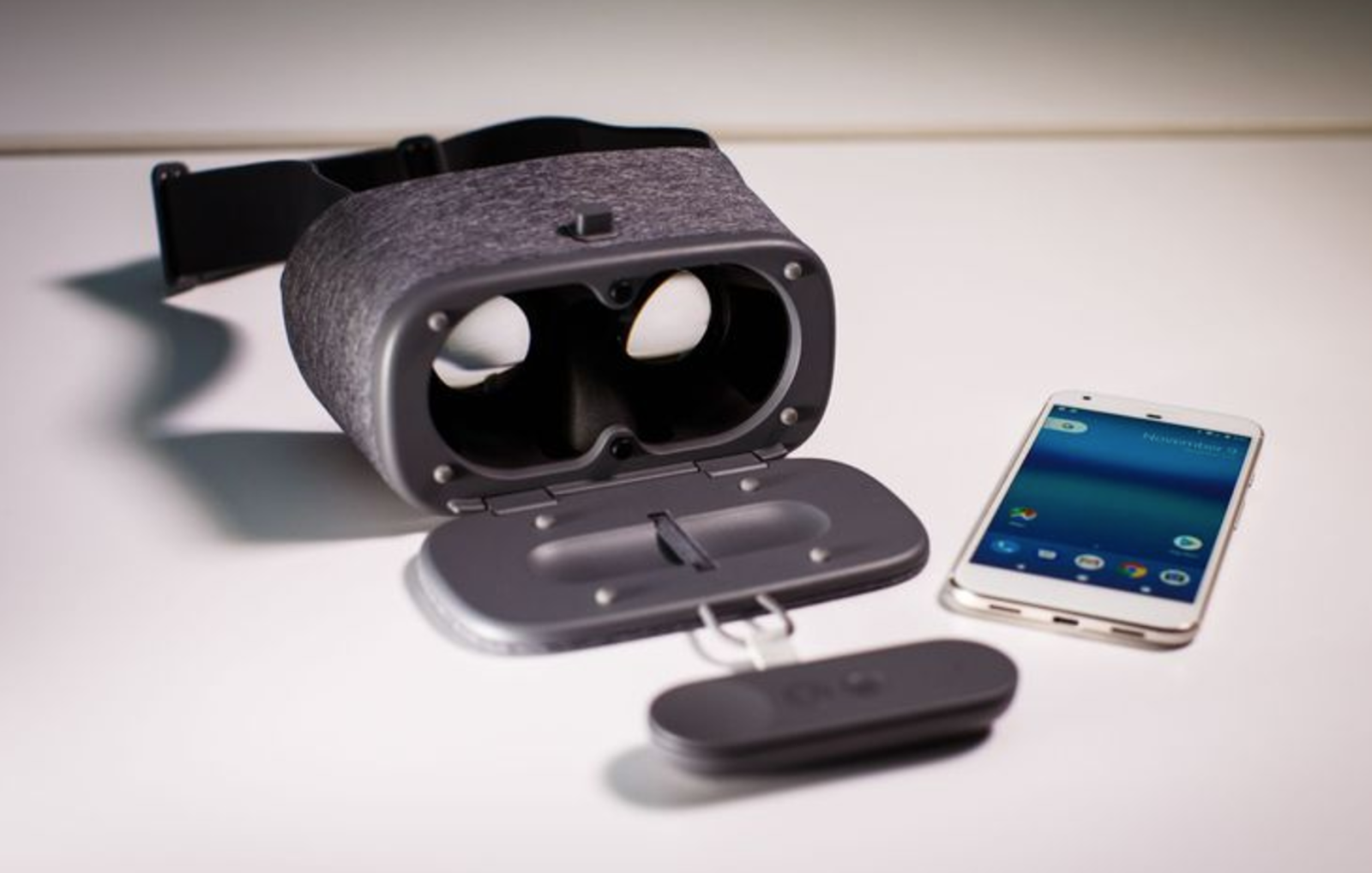
It's a soft cloth eyebox that turns any compatible phone into a VR headset, and it comes complete with its own Wii-like motion controller for manipulating objects and menus in VR.

It's the easiest VR to use by far, But does that mean you should run out and buy one? Not necessarily. Not yet, anyhow.

Magical but murky
One of the pitfalls of most VR is the number of cords, ports and things you have to adjust. The Daydream View puts them all to shame. Here are the steps to set it up:

Open the headset's front door and remove the included controller
Turn on your phone (if it's off) and place it on the door
Close the door, place the headset on your head and adjust until the image looks clear
Adjust the straps
Hold down a button on the controller to calibrate, and start playing.
That's it. No adjusting the lenses, no fiddling with pairing procedures, no ports or cables to plug in. The phone automatically pairs with the headset and adjusts the screen to the correct position, like magic.

Once you're inside, the included motion controller makes navigating menus a breeze. Just point where you want to go, and a little mouse cursor follows your motion quickly and accurately.

Just know that "easy" doesn't mean "perfect."

When I handed the Daydream View to my colleagues, many of them instinctively put it on the wrong way. The curved straps are supposed to rest on top of your head (like a crown) but it's tempting to cinch them down like a pair of ski goggles -- which isn't terribly comfortable.

And though the Daydream View is almost entirely made of soft, cushiony fabric instead of hard plastics, that didn't stop my wife and colleagues from complaining how front-heavy it was with a large Pixel XL phone inside. Even if it weighs less than a pound (roughly 0.85 lbs with the phone) there's still potential for neck strain over time.

The image quality is good -- I definitely felt like I was somewhere else! -- but it's not going to fool anyone who doesn't want to be fooled. And I often found I had to recalibrate the headset and controller in the middle of a session (it's easy -- just hold down the home button).

I even found a bug that makes VR totally unusable until I reboot the phone -- though I understands a software fix for that is coming soon.

Here's the rub: unless you have a Google Pixel or other Daydream-certified phone, the Daydream View won't work at all. That's by design: Google's pitch is that Daydream can keep you from getting sick in VR by ensuring both phones and apps meet a certain quality standard.

But that means a murky future for Daydream, because we honestly don't know how many phone manufacturers and app developers will wholeheartedly support Google's new platform -- or if the results will be as good as these preliminary ones. Even the 5-inch Pixel offers a lesser experience than the 5.5-inch Pixel XL, because its screen is lower-resolution.

Kamis, 15 September 2016

Review : Xiaomi Mi 5

When the Xiaomi Mi3 launched in Malaysia a couple of years ago, it had been, for lack of a better word, a veritable phenomenon; a Full HD smartphone with the blistering, at the time, Qualcomm Snapdragon 800 for under RM1,000 is truly unheard of. As expected, demand became so great that the first flagship smartphone for Xiaomi routinely sold out.

It seemed like everyone and his uncle either had one or is clamouring for one. Xiaomi had seemingly crashed the proverbial party, sending their rivals into a rethink. In the intervening couple of years between then and the launch of their new flagship, the Xiaomi Mi 5, the landscape has changed quite a bit: ‘Flagship killers’ abound, all of which boast high-end specs for a fraction of what they used to cost.


Can the this new entrant maintain Xiaomi’s momentum as it transitions from upstart into a mainstay?

Design: Metallic Compromise

Wrapped in an aluminium shell, the Xiaomi Mi 5 ticks most boxes when it comes to high-end smartphone design. Its curved edges break the monotomy of most boxy designs and makes it looks very similar to Samsung’s Galaxy S7. Where they differ though, is Xiaomi’s decision to make it more of a slant rather than a simple curve, resulting in a chassis that can be rather difficult to hold with confidence.


As I was usually only holding a small surface area of the phone, it always felt like it was going to slip out of my hands. Still, usability aside, it’s certainly a beautiful phone to behold and will attract its fair share of attention.

The volume rocker and power button are easy to depress and provide good tactile feedback. Nested within the physical home button is also a finger print reader like one found on the Apple iPhone. However, Xiaomi’s application leaves a little to be desired; not only does the narrow button consistently fail to identify my fingerprint, it also hangs for some time before it recognises a second input, leading me to simply key in the PIN most of the time.


It also requires the button to be depressed for the fingerprint reader to be activated, a move that is far less efficient than the round back-facing fingerprint reader found on other smartphones like the Google Nexus 6P or ASUS ZenFone 3.

At the very least, it rocks a USB Type-C port. That is a must for flagships now.


Performance: Red Hot Literally

Like most flagships, the Xiaomi Mi 5 packs the latest Qualcomm Snapdragon 820, promising lightning fast speeds and smoothness. Unfortunately, unlike other markets, we’ll only be getting the lower spec variant, clocking in at 1.8GHz compared to the full bore processor at 2.15GHz. Predictably, benchmarks do take a sizable hit, with Geekbench 3 only delivering 1904 for the single core score and 4664 for the multi-core.

This compares poorly against the international benchmarks of around 2300 for the Single-Core and 5300 for the Multi-Core. Thankfully though, general performance of the Xiaomi Mi 5 remains snappy; applications open swiftly, multitasking was a breeze and the Adreno 530 made short work of even the latest games.

Strangely, though, despite the lower clock speed of the Qualcomm Snapdragon 820 processor, the Xiaomi Mi 5 became really hot even doing minor things such as web browsing. Occasionally, the phone would start burning up as it simply sits in my pocket. While the heat didn’t affect the performance of the device much, it is disappointing that the temperature management is a real issue here. Unlike previously, I'd expect most users will now be forced to get a case to deal with it.

Display: Vibrant Enough

Despite only packing a Full HD display compared with the 1440p resolution of something like a LG G5, the 5.15in IPS panel here is absolutely gorgeous, with great brightness, detail and contrast being punched out. At this screen size, pixelation is more or less non-existent and most people will be very happy with it. In terms of colours, it errs towards a more vivid template like a Samsung panel as opposed to more muted, realistic colours you get on the Apple iPhone.

Additionally, while the top and lip of the phone still sport sizable bezels, the sides of the display are almost edge-to-edge, leading to a truly immersive viewing experience when watching videos or playing games.


Audio: Falls Short

Unfortunately, the user immersion is broken down by the sub-par speakers found on the Xiaomi Mi 5. Bad enough that it is down-firing, the single speaker, which is barred up with a single grill piece, barely passes the mustard when it comes to audio fidelity, with overly sharp highs and muddy mids.

The bass is pretty much absent as well, leading to a hollow sounding experience. Thankfully, the Xiaomi Mi 5 still packs a 3.5mm audio jack, so you can quickly plug in a good pair of cans. Unlike an upcoming flagship from Cupertino.


Camera: Commendably Usable

With a 16MP, f /2.0 rear facing camera, the Xiaomi Mi 5 comes loaded with a shooter that is more or less par for the course specs wise. However, when compared to the kings of the hill, it can’t match-up just yet. Make no mistake; this new Xiaomi flagship is definitely a decent shooter.

Most at ease in a brightly lit environment, the Xiaomi Mi 5 main camera is perfectly capable of producing images with decent colours and details. HDR also worked pretty well, though you’ll need some very stable hands to get clear shots.

Where it tends to suffer a little is when the ambient lighting starts getting dark. The software tends to aggressively bump the ISO up, resulting in some pretty grainy images that hurt the overall clarity. While not truly perfect, it’ll definitely do in a pinch.


On the flip side, its front camera will certainly satisfy the selfie taker in most of users as it comes with a wide enough angle lens to get most of subjects in the picture. It also helps that the shots produced are clear and full of detail.

Conclusion: It Delivers as Promised

Xiaomi may still be a juggernaut in the sub-RM1,000 (~US$250) smartphone segment, but as a flagship model approaching the psychological RM2,000 mark, the Xiaomi Mi 5 isn’t such an easy choice.

With competitors like OPPO and OnePlus, the Xiaomu Mi 5 needs to distinguish itself a bit more. It’s certainly a capable smartphone, but there are other options out there that might tempt even the most hardcore of Xiaomi fans around the block.

Kamis, 08 September 2016

Hands On With the Google Nexus Player


Google's Nexus Player is the company's best stab at the TV so far. I got a demo of it today at a Google event, and I'm hopeful. Hopefully, we'll see Android TV introduced into sets at CES.

The Nexus Player is a little disc, made by Asus and running an Intel Silvermont processor, which plugs into your TV. It comes with a small black remote (simple, not complex like some of the silly Google TV remotes were), and it has an optional gamepad. Its only ports are an HDMI-out, a power port, and a USB jack; I didn't see Ethernet, for instance.

Plug it into your TV, and you see a "smart TV" interface centered on content from Google Play, which takes top billing. What's really interesting is what's going on down below, though. According to Google, the Nexus Player is "just an Android device" and will run "any app downloaded from Google Play."

I can't wait to see how that plays out. Games, for instance, are restricted by their interfaces. If you want to play games, you'll probably want a Bluetooth gamepad like Asus's $39 unit, and you'll want to play gamepad-compatible games. Fortunately, there are a lot of those nowadays. You can also use a paired Android phone as an input device.


View all Photos in Gallery
The hotter question is whether all the Google Play entertainment apps will let themselves be run on the Nexus Player. Our demo sample showed Netflix, Pandora, Hulu and, of course, YouTube. So far, so good. But what about HBO GO? And Amazon, which has structured its Prime streaming app so it plays on Android phones but not tablets? Whether you'll really be able to play any content that Android suppors, or whether content owners will block this device, is a critically unanswered question.

The Nexus Player also does everything a Chromecast does, showing content from other Android devices in the home.

Like with Amazon's Fire TV , Google has also invested in voice search being a major way to search the company's content library. A search for "Halloween movies," spoken into the remote, turned up the whole horror movie series on Google Play and a lot of more family-friendly content on YouTube.

The Nexus Player costs $99 and enters a crowded field full of Amazon Fire TVs, Chromecasts, Rokus and such. They all suffer from the "Input 1 problem," which is that most ordinary consumers don't want to have to switch inputs away from their cable box or console gaming system for their content.

But the Nexus Player's real value is as a harbinger of Android TV. Sony, Sharp, and Philips have all said they'll bring Android TVs to market soon, probably at CES. The smart TV market is still a mess of competing, complex, proprietary interfaces, which has slowed the development of TV-compatible apps in general. Google's going to make a bid here, once again, to standardize and simplify.

For more, see PCMag's hands on with the Nexus 6 smartphone and Nexus 9 tablet (video below).